
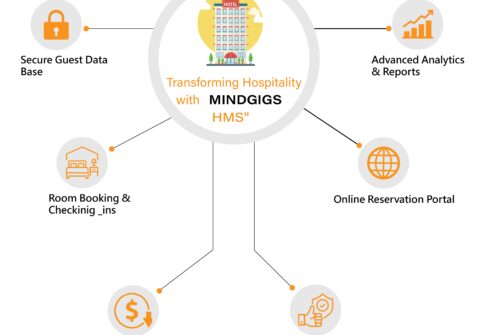
Welcome to MINDGIGS Hotel Managemnet System, a Project of MINDGIGS, we’re committed to pioneering solutions that redefine the hospitality landscape. We’re thrilled to unveil our newest achievement, the HOTEL MANAGEMENT SYSTEM. This state-of-the-art system reimagines hotel operations, providing seamless workflows and heightened efficiency. Stay tuned for further updates as MINDGIGS remains at the forefront of technological innovation in the hospitality industry.

In today’s fast-paced hospitality sector, efficient management of hotel operations is essential for delivering outstanding guest experiences and maximizing profitability. The emergence of digital solutions like the Hotel Management System (HMS) has transformed how hotels operate, offering powerful tools to automate and manage daily tasks.
HMS solutions built using Laravel or PHP have become widely popular due to their flexibility, security, and scalability. These technologies allow for highly customizable systems tailored to the specific operational needs of any hotel — from boutique lodgings to luxury resorts.
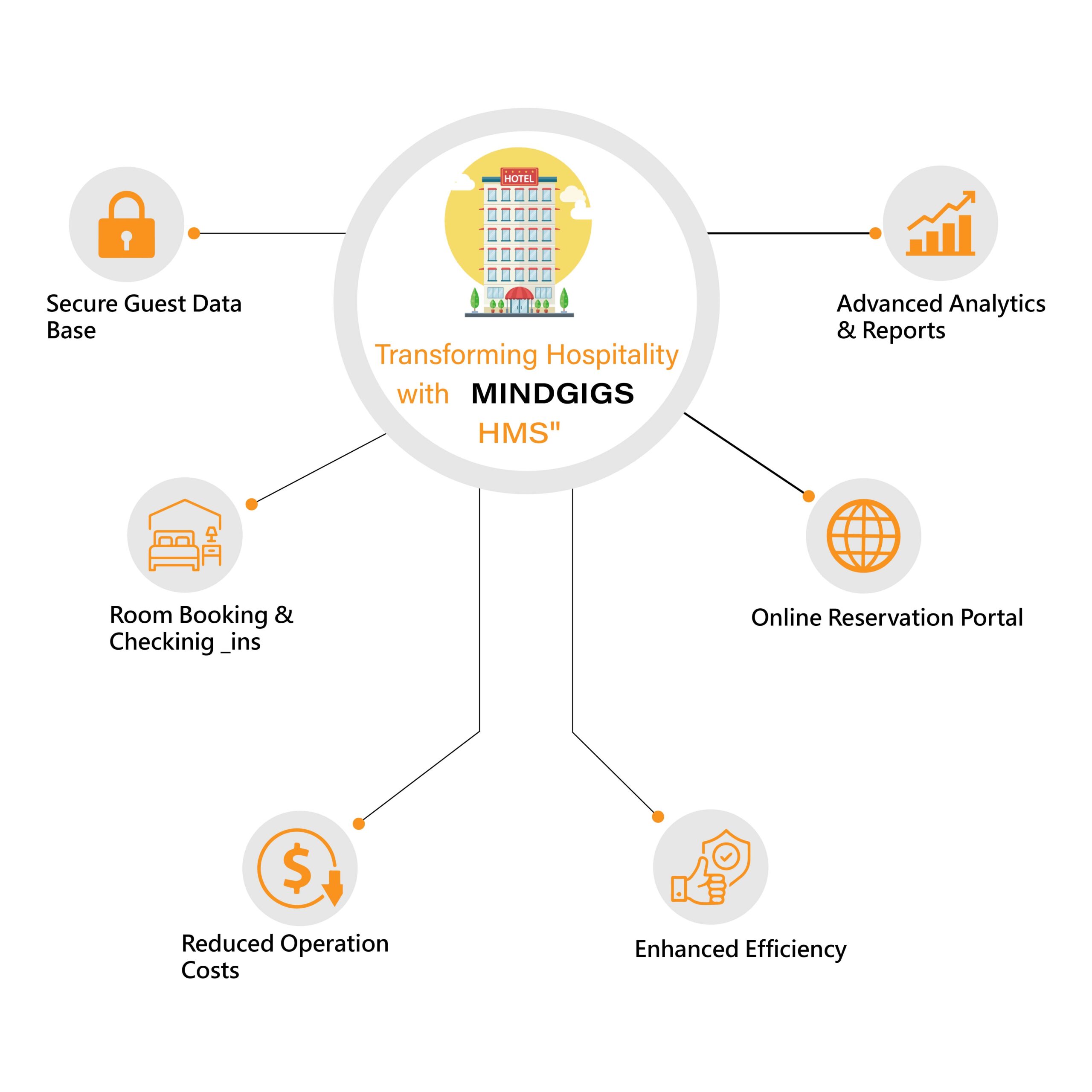
The database is the core of any HMS, managing guest profiles, reservations, room availability, and billing, ensuring seamless communication and data integrity across all hotel operations.

The Hotel Management System automates bookings, check-ins, housekeeping, and billing—reducing errors, easing workload, and enabling staff to focus on improving overall guest experience through efficient, technology-driven operations.
With built-in analytics, hoteliers gain real-time insights into occupancy, revenue, and guest behavior—enabling smarter decisions and more effective, targeted marketing strategies to boost performance and guest satisfaction.
A well-designed Hotel Management System website enhances visibility and guest engagement through seamless booking, secure payments, and a mobile-friendly interface—building trust and increasing overall reservation conversions.
Using Bootstrap templates makes the HMS interface visually appealing, mobile-friendly, and universally compatible—enabling hotel staff to manage operations smoothly and efficiently from any device, anywhere.

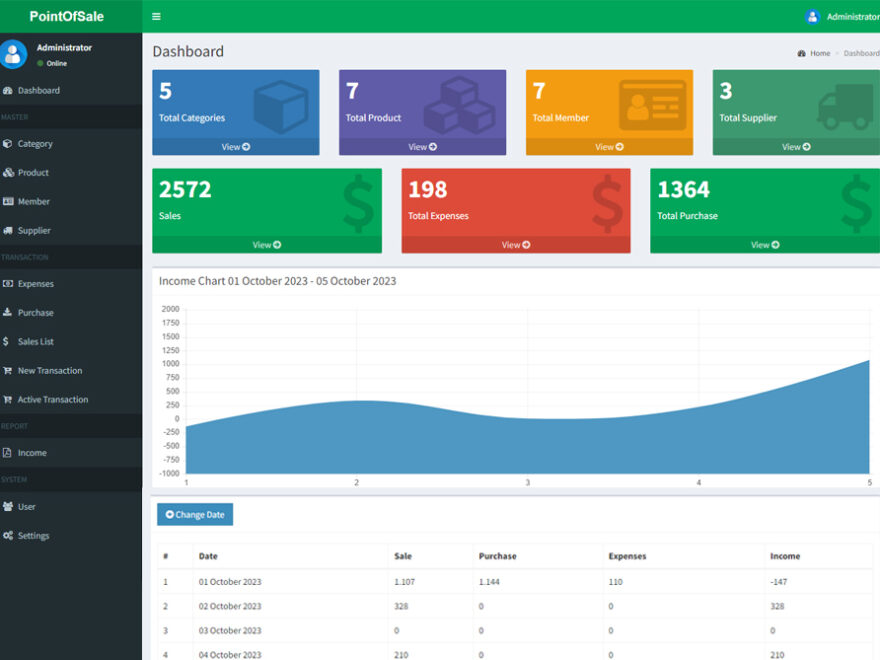
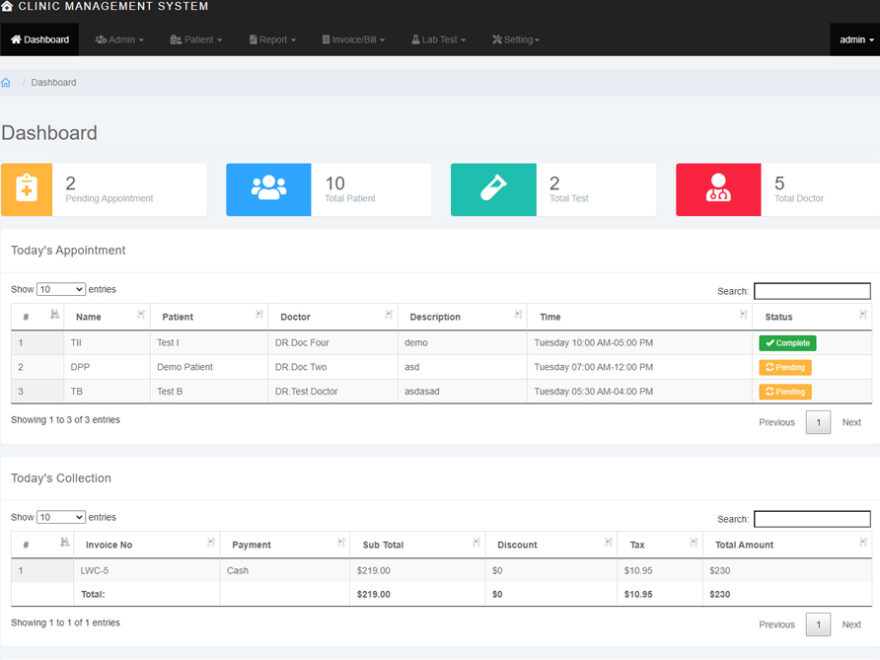

Implementing an HMS offers several advantages:
Ultimately, it supports the hotel in delivering top-tier hospitality experiences and staying competitive in the market.
A powerful Hotel Management System is essential for modern hotel operations. It enhances efficiency, improves guest engagement, and drives profitability. MINDGIGS’ innovative HMS solution offers a comprehensive, scalable platform to help hoteliers streamline operations and succeed in an increasingly digital hospitality landscape.


At MindGigs, we pride ourselves on pioneering innovative solutions in various sectors, and our latest endeavor focuses on enhancing efficiency in logistics through our cutting-edge packing management system. In today’s fast-paced world, optimizing packing processes is crucial for businesses striving to meet customer demands while maintaining cost-effectiveness. Our packing management system offers a comprehensive solution to streamline packing operations, revolutionizing the way businesses manage their inventory and shipments.
Welcome to MindGigs, where innovation meets efficiency in the realm of logistics. Our latest breakthrough, the Packing Management System, is designed to revolutionize the way businesses manage their packing operations. With a comprehensive suite of features and unparalleled functionality, our system is set to redefine the standards of excellence in packing management.
Our Packing Management System boasts a robust set of features aimed at enhancing productivity and accuracy:
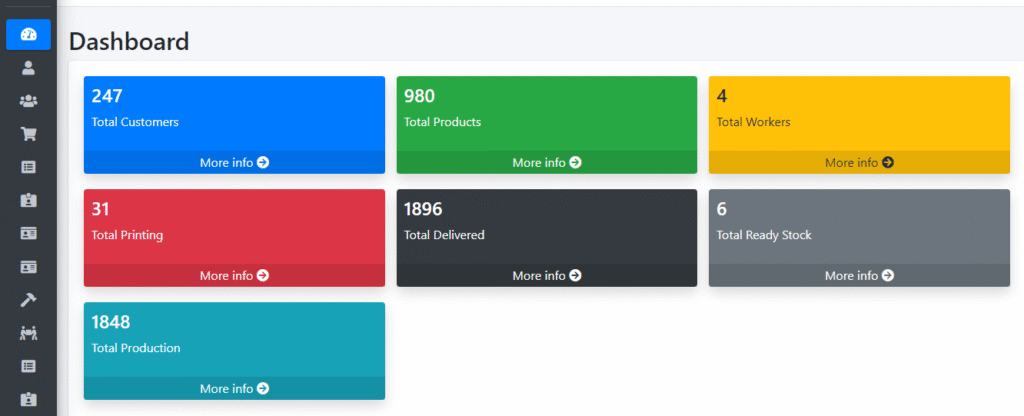
Gain comprehensive insights into your packing operations at a glance with our intuitive dashboard interface.
Seamlessly add new customers to your database with just a few clicks, ensuring efficient communication and order processing.

Keep track of all your customers in one centralized location, facilitating easy access to customer information and order history.
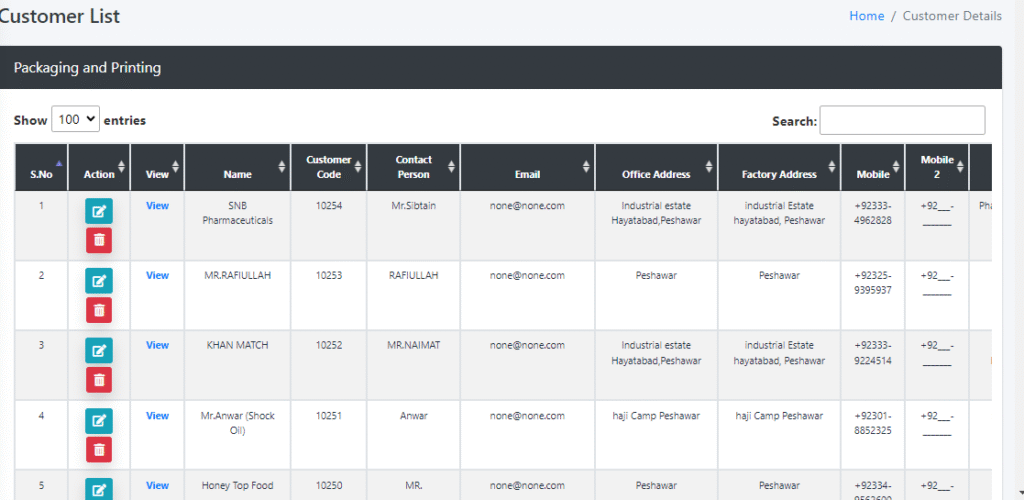
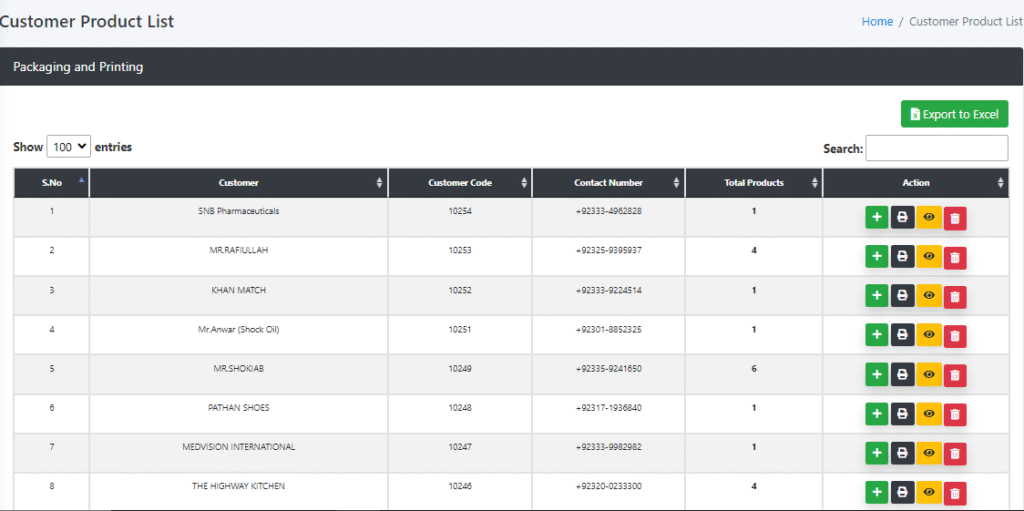
Access a comprehensive list of products associated with each customer, enabling personalized packing solutions tailored to their specific needs.
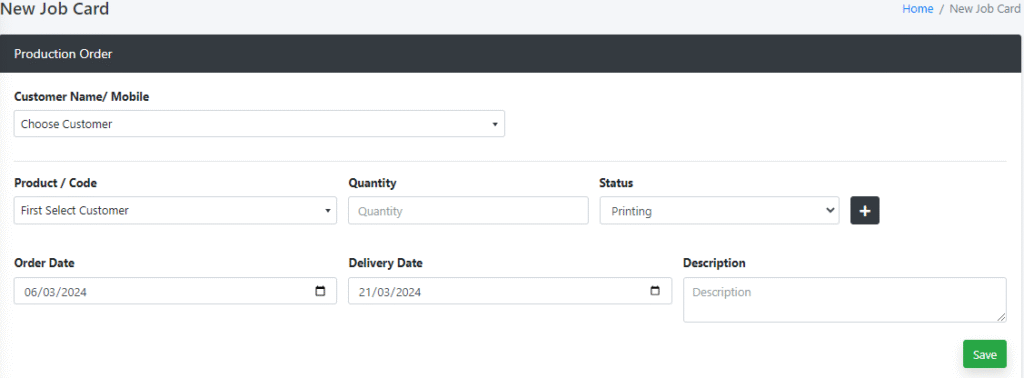
Generate new job cards quickly and efficiently, specifying packing requirements and deadlines with precision.
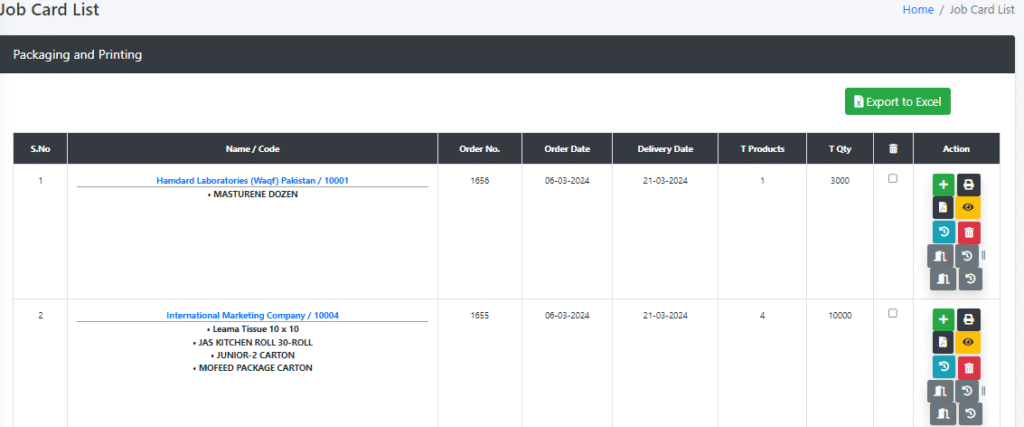
Keep track of all active job cards, ensuring timely completion and delivery of packed goods.
Assign tasks to designated workers with ease, optimizing manpower allocation and maximizing efficiency.
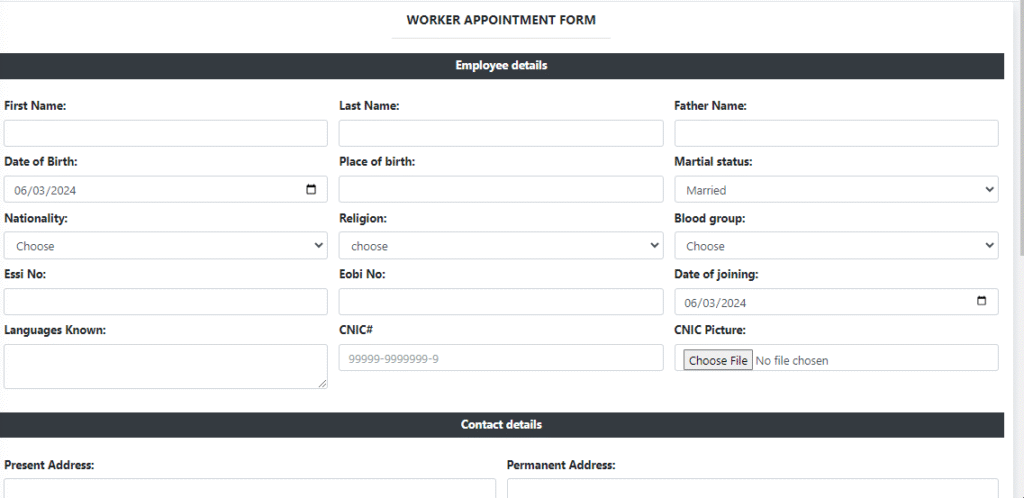
Maintain a database of all workers involved in the packing process, complete with contact information and skill sets.
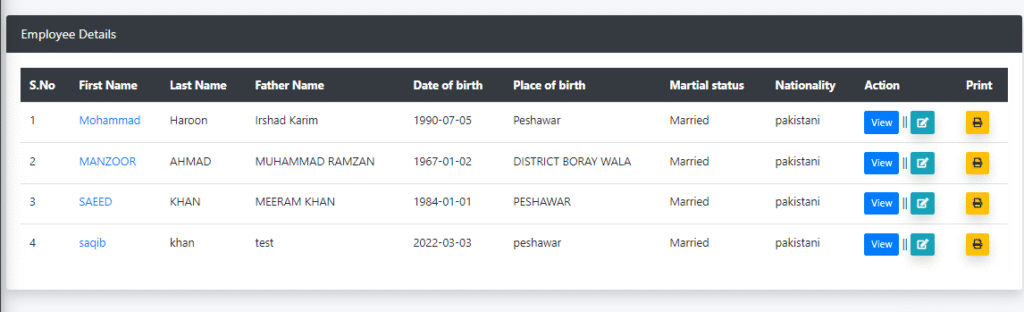
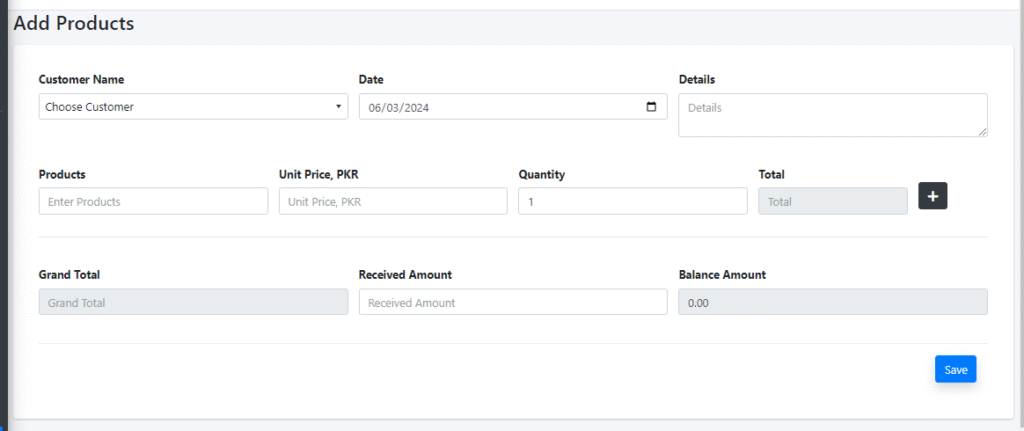
Generate accurate invoices for packed goods, providing transparency and accountability in financial transactions.
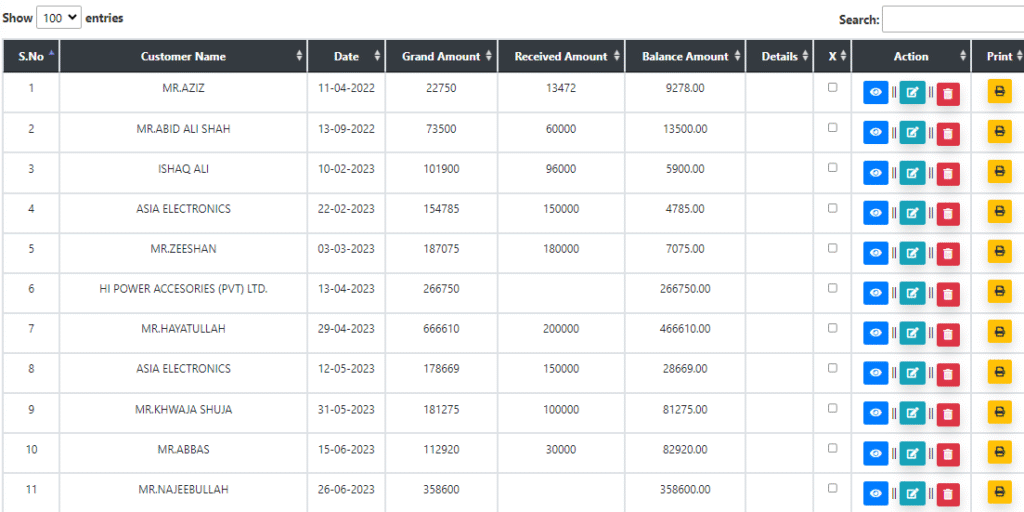
Access a comprehensive list of all product invoices, facilitating easy tracking and reconciliation of accounts.
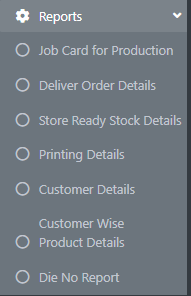
Generate detailed reports on packing performance, productivity metrics, and inventory levels, empowering data-driven decision-making.
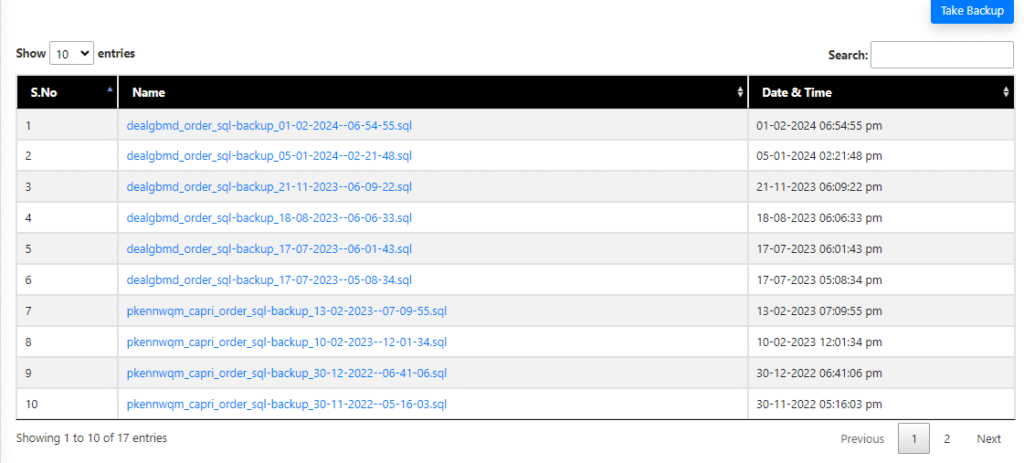
Ensure data integrity and security with regular database backups, safeguarding against potential loss or corruption.
Customize system settings to align with your unique business requirements, ensuring a tailored solution that meets your needs.
Central to the effectiveness of our Packing Management System are the Packing Managers who oversee operations with precision and expertise. With responsibilities ranging from logistical planning to resource management, Packing Managers play a pivotal role in driving efficiency and ensuring quality control throughout the packing process.
For individuals aspiring to pursue a career in logistics, the role of a Packing Manager offers exciting prospects for growth and development. From overseeing packing operations to managing teams of workers, Packing Managers play a crucial role in ensuring operational excellence and customer satisfaction.
Salary and Responsibilities
The salary of a Packing Manager varies depending on factors such as experience, industry, and geographical location. However, with the increasing demand for skilled professionals in the field of logistics, the role of a Packing Manager offers competitive compensation and ample opportunities for career advancement.
In conclusion, our Packing Management System represents a paradigm shift in the way businesses approach packing operations. By leveraging advanced technology and intuitive design, our system empowers businesses to streamline processes, enhance productivity, and deliver exceptional results. Whether you’re a small-scale enterprise or a multinational corporation, our Packing Management System is the ultimate solution for optimizing your packing operations and driving success in the competitive world of logistics.
Contact MindGigs today to learn more about how our Packing Management System can revolutionize your business and propel you towards new heights of efficiency and profitability.


MindGigs recently completed a cutting-edge installment software project, “MindGigs Installment Software,” specializing in installment agreements, comprehensive customer documentation, a robust monthly payment system, partner and investor profit management, detailed reporting capabilities, and more. Explore our demo link and video to experience how this software streamlines financial management with precision and efficiency.
In today’s fast-paced business environment, managing financial transactions and agreements efficiently is paramount. MindGigs, Peshawar’s leading IT software house, introduces an innovative solution that addresses this need: MindGigs Installment Software.
Designed to streamline and optimize financial management, this software empowers businesses to achieve more with less effort.
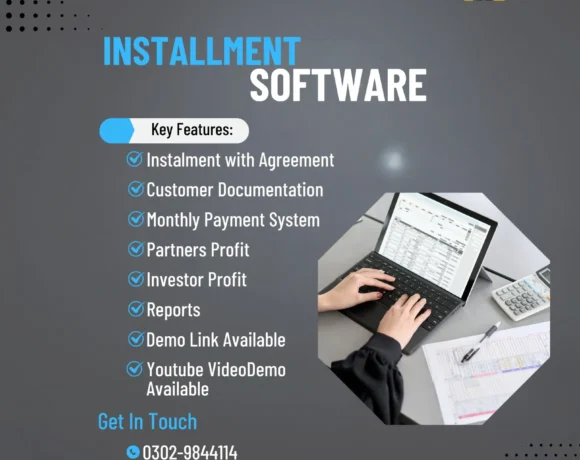
One of the standout features of MindGigs Installment Software Australia is its ability to manage installment agreements comprehensively. Whether you’re handling complex financial arrangements or straightforward payment plans, the software ensures all agreements are clearly defined and systematically managed.
This feature minimizes the risk of errors and misunderstandings, fostering trust and transparency between businesses and their clients.
Effective customer documentation is crucial for maintaining accurate records and ensuring compliance with legal and regulatory standards. MindGigs’ Installment Software includes robust documentation capabilities that allow businesses to store, retrieve, and manage all customer-related documents effortlessly. This functionality not only saves time but also enhances the overall customer experience by providing quick access to essential information.
Managing monthly payments can be a tedious task, often requiring significant administrative effort. MindGigs’ Installment Software simplifies this process with its seamless monthly payment system. Businesses can automate recurring payments, ensuring that all transactions are processed on time and without hassle. This feature reduces the administrative burden on staff and ensures a steady cash flow, which is vital for business stability and growth.
For businesses with multiple stakeholders, managing partner and investor profits can be challenging. MindGigs’ Installment Software addresses this issue with advanced tools that track and distribute profits accurately. This feature provides a clear overview of financial performance, enabling businesses to make informed decisions and maintain healthy relationships with their partners and investors.
In today’s data-driven world, having access to detailed and actionable insights is crucial for business success. MindGigs’ Installment Software offers comprehensive reporting capabilities that generate detailed reports on payment histories, financial trends, and customer behaviors. These reports provide valuable insights that help businesses optimize their strategies, improve financial outcomes, and stay ahead of the competition.
Understanding that ease of use is essential for any software solution, MindGigs has designed its Installment Software with a user-friendly interface. The intuitive design ensures that businesses can quickly adapt to the software, minimizing the learning curve and maximizing productivity. Additionally, MindGigs offers a demo link and video demonstration, allowing potential users to explore the software’s features and benefits firsthand.
MindGigs is not just another IT software house; it is a beacon of innovation and excellence in Peshawar. Since its establishment in 2010, MindGigs has consistently delivered top-tier solutions in web development, mobile app development, digital marketing, and graphic design. Our commitment to quality and client satisfaction sets us apart as the best IT software house in the region.
Our Installment Software is a testament to our dedication to providing solutions that meet the evolving needs of businesses. By choosing MindGigs, you are partnering with a team of experts who are passionate about helping you achieve your business goals. We understand the challenges you face and are here to provide the tools and support you need to succeed.

MindGigs’ Installment Software in Ghana is more than just a financial management tool; it is a comprehensive solution designed to transform how businesses handle financial transactions and agreements. With features like comprehensive installment agreements, robust customer documentation, a seamless monthly payment system, partner and investor profit management, and detailed reporting capabilities, our software empowers businesses to operate more efficiently and effectively.
Experience the difference with MindGigs’ Installment Software and take the first step towards transforming your financial management today. Contact us to learn more or to request a demo. Discover why MindGigs is the top-rated software house in Peshawar, trusted by businesses for our innovative solutions and unwavering commitment to excellence.


Empower your financial transactions with cutting-edge currency exchange software solutions. At MindGigs, we specialize in delivering comprehensive guides tailored to your needs. From exploring free downloads to delving into open-source options, we ensure you navigate the world of currency exchange seamlessly. Our expertise extends to foreign exchange software, catering to institutional clients and individual users alike. Whether you’re in Peshawar, Islamabad, or anywhere else in Pakistan, our guides provide invaluable insights into choosing the right software, implementing best practices, and overcoming common challenges. Trust MindGigs to be your partner in optimizing currency exchange processes and achieving your financial goals.
Currency exchange software serves as a digital platform for the swift and secure exchange of currencies. From facilitating transactions for multinational corporations to aiding travelers in converting their funds, these software applications play a vital role in ensuring smooth financial operations. Whether you’re accessing foreign exchange software vendors‘ platforms or utilizing currency converter software android apps, the goal remains consistent: efficient currency conversion.
In today’s interconnected world, the importance of reliable currency exchange software cannot be overstated. Whether you’re conducting business internationally or planning a personal trip abroad, these tools simplify the process of converting currencies. They provide real-time exchange rates and secure channels for transactions, mitigating risks associated with fluctuating currency values.
Currency exchange software comes in various forms to cater to diverse user needs. Some users may opt for currency exchange software open source solutions for their flexibility and customization options. Others may prefer money exchange software free download versions for their accessibility and cost-effectiveness. Additionally, currency converter software android apps offer convenience for users on the go, providing instant currency conversion at their fingertips.
While currency exchange software primarily targets retail transactions, foreign exchange software caters to institutional clients such as banks and investment firms. These platforms offer advanced features tailored to institutional trading needs, including real-time market data and algorithmic trading capabilities. Whether you’re accessing currency exchange software in Peshawar or currency exchange software in Pakistan, these platforms provide robust solutions for financial institutions.
Selecting the appropriate currency exchange software involves considering various factors such as user interface, security features, and integration capabilities. Whether you’re in Islamabad or any other part of Pakistan, conducting thorough research is essential to find a solution that aligns with your specific requirements. From currency exchange program Python scripts to currency exchange program in Java applications, there’s a diverse range of options to explore.
For developers and programmers, currency exchange software presents opportunities for innovation and customization. Programming languages like Python and Java offer robust frameworks for building custom applications tailored to specific requirements. Whether you’re developing a currency exchange program Python script or a full-fledged currency exchange program in Java, these languages provide the flexibility and scalability needed for development projects.
Successful implementation of currency exchange software requires careful planning and execution. Whether you’re integrating the software into existing systems or developing custom solutions, thorough planning is essential. From conducting pilot tests to providing comprehensive training, adopting best practices ensures a smooth transition and maximizes the benefits of the software.
Despite their advantages, currency exchange software solutions may encounter challenges such as fluctuating exchange rates and regulatory compliance issues. Staying informed about industry trends and implementing proactive measures are essential for addressing these challenges and optimizing software usage.
Currency exchange software comes in both free and paid versions, offering varying levels of features and support.
Yes, developers can leverage programming languages like Python and Java to create custom currency exchange applications tailored to their specific requirements.
Key factors to consider include user interface, security features, integration capabilities, customer support, and scalability.
Yes, mobile apps provide convenient options for currency conversion, catering to the needs of travelers and remote workers.
In conclusion, currency exchange software plays a crucial role in facilitating global financial transactions. Whether you’re a business conducting international trade or an individual traveler, having access to reliable software is indispensable. From currency exchange software near me searches to exploring options in Peshawar, Islamabad, or other parts of Pakistan, the right software can streamline currency conversion processes and empower users to achieve their financial goals.


In today’s fast-paced and competitive business landscape, the ability to negotiate effectively can often be the difference between success and stagnation. Whether it’s securing favorable terms with suppliers, navigating complex labor negotiations, or managing relationships with key stakeholders, organizations must possess robust bargaining management strategies to thrive. Enter the Bargaining Management System—a dynamic framework designed to streamline negotiations, optimize decision-making processes, and ultimately drive organizational success. In this comprehensive exploration, proudly presented by MINDGIGS, we delve deep into the world of bargaining management, examining its intricacies and highlighting the transformative power of a well-implemented system.
At its core, bargaining management encompasses the art and science of negotiation—leveraging tactics, strategies, and tools to achieve desired outcomes while maintaining positive relationships with counterparties. Let’s dissect some critical facets of bargaining management:
At the heart of effective bargaining lies a clear and concise bargaining management definition. It refers to the systematic approach organizations employ to navigate negotiations successfully, balancing competing interests and objectives to reach mutually beneficial agreements.
Central to any bargaining strategy is the presence of a skilled and knowledgeable management bargaining unit. Comprising seasoned negotiators equipped with a deep understanding of industry dynamics, contractual intricacies, and negotiation best practices, these units serve as the vanguards of organizational interests during negotiations.
Understanding and leveraging management bargaining power of suppliers is critical in achieving favorable outcomes. By strategically assessing and enhancing their bargaining position, organizations can negotiate better terms, lower costs, and gain a competitive edge in the marketplace.
For organizations with unionized workforces, navigating collective bargaining is a pivotal aspect of labor relations. Understanding the nuances of collective bargaining management rights and styles is essential for fostering productive labor-management relationships and ensuring compliance with legal frameworks.
While the principles of bargaining management are universal, the execution often requires a tailored approach. Here’s how organizations can design and implement an effective bargaining management system:
A cornerstone of any bargaining management system is a centralized platform that serves as the nerve center for all negotiation-related activities. This platform facilitates communication, document management, and progress tracking, fostering transparency and accountability throughout the negotiation lifecycle.
In an era defined by data, harnessing analytics is paramount for effective bargaining management. By leveraging insights into market trends, supplier performance metrics, and historical negotiation data, organizations can make informed decisions, optimize strategies, and maximize negotiation outcomes.
Successful negotiation is as much about collaboration as it is about competition. Organizations must foster a culture of collaboration, encouraging cross-functional teamwork, knowledge sharing, and alignment of goals and objectives across departments and stakeholders.
In the ever-evolving landscape of negotiation, flexibility is key. Organizations must continuously adapt their bargaining strategies in response to changing market dynamics, regulatory environments, and stakeholder expectations, ensuring agility and resilience in the face of uncertainty.
In conclusion, the importance of effective bargaining management cannot be overstated in today’s hyper-competitive business environment. By embracing the principles of negotiation, leveraging technology and data analytics, and fostering a culture of collaboration and adaptability, organizations can unlock new opportunities, mitigate risks, and drive sustainable growth. This project, undertaken by MINDGIGS, represents a commitment to empowering organizations with the knowledge, tools, and strategies needed to excel in bargaining management and emerge as industry leaders in negotiation excellence.


MindGigsPK builds custom plaza management software for plaza owners, co-owned buildings, building associations, and property managers in Peshawar and across Pakistan. You get shop and unit records, tenant and lease tracking, rent collection, shared utility and generator billing, and maintenance requests in one system — shaped around your floor layout and ownership structure, not squeezed into a generic rental app.
A plaza management system is software that runs a commercial building’s day-to-day operations from one place. It records every shop and office, tracks each tenant’s lease and rent, splits shared electricity and generator bills across tenants, and logs maintenance complaints until staff resolve them. In short, it replaces the rent register, the receipt book, and the separate utility ledger that most Peshawar plazas still run on.
We build the system around your real building — how many floors, how many shops, whether one owner holds the whole plaza or several owners rent out their own units. Most owners start with the two things that cost them the most time each month: tenant records and rent collection. From there, you add utility billing, common-area charges, and maintenance tracking as your building needs them.
We build the system module by module. Most plazas start with tenant records and rent collection, then add utility billing, common-area charges, and maintenance tracking.
Hold a record of every shop and office — floor, size, rent, and current status — so you always know what you have rented and what sits vacant.
Store tenant details, lease and agreement terms, renewal dates, and scanned documents against each shop, so nothing lives only in a drawer.
Generate monthly rent vouchers, record payments, and keep a running ledger per tenant. The system builds your rent roll for you.
See who owes what at a glance, with an up-to-date defaulter list and automatic reminders before rent turns into a long overdue balance.
Record every advance and deposit per tenant, so refunds and adjustments at move-out never turn into a guessing game.
Split electricity and shared generator costs by sub-meter reading, fixed share, or unit size, then bill each tenant alongside rent.
Divide shared costs — cleaning staff, security guards, common-area electricity — across tenants by an agreed formula, every month.
Log lift, generator, cleaning, and repair requests, assign them to staff, and track each one to resolution instead of losing it in a phone call.
Give each owner in a co-owned plaza a private view of rent and reports for their own units, while you keep the building-wide picture.
Give each owner in a co-owned plaza a private view of rent and reports for their own units, while you keep the building-wide picture.
Send automated SMS and WhatsApp messages for rent due dates, maintenance updates, and building announcements, straight from the system.
Track income and expenses for the whole building, and pull the reports you need — collection, occupancy, arrears — in a few clicks.
Manage more than one building? The system runs several plazas from a single dashboard, with a separate view for each property and a consolidated view across all of them.
If any of these sound like your plaza, a proper system pays for itself in the time your office stops wasting every month.
Working out each shop's share by hand takes hours and rarely satisfies everyone. The system splits utilities by meter, share, or size, and bills each tenant a clear amount.
Someone calls each tenant by hand, checks the register, and still misses a few. The system shows exactly who owes rent this month and sends reminders on its own.
A lift breaks, a tenant calls, and nobody tracks whether staff ever fixed it. The system logs every complaint, assigns it, and follows it to resolution.
You want to know occupancy, arrears, and this month's collection in one look — not by flipping through pages. A dashboard gives you all of it at once.
Each owner wants their own numbers without seeing everyone else's. The system reports per owner and for the whole plaza at the same time.
When a tenant leaves, no one remembers the exact advance or deposit. The system tracks every amount per shop, so refunds and adjustments stay clean.
Every record you enter turns into a report you can actually use — no more adding up a register by hand at month-end.
Every shop, its tenant, the agreed rent, and its payment status for the month, on one sheet.
Exactly who owes rent, how much, and for how many months — sorted by the biggest balances first.
How much rent you billed, how much you collected, and what remains outstanding this month.
How many shops sit rented versus empty, floor by floor, so you can act on vacant units.
How the electricity and generator bill divides across tenants for the month, with each share shown.
A clean statement for each owner in a co-owned plaza, covering only their own shops.
What the building earned and spent over any period, kept separate from individual tenant ledgers.
A full payment history for any single shop, ready when a tenant questions their balance.
We learn your floor layout, ownership structure, and rent cycle. Most owners receive a proposal within 48 hours.
We write a clear scope covering exactly which modules you need, at a fixed price you approve before we start.
We build and configure the system against your real shop list, rent amounts, and utility-split formula — not a demo dataset.
We import your existing records and train your office staff on the system before go-live, so no one has to guess.
We launch with you and back it with a defined support window, plus optional ongoing maintenance as your building grows.
The same core system adapts to your building — single-owner or co-owned, one plaza or several — and we configure it to match, rather than force it into one template.
Every record you enter turns into a report you can actually use — no more adding up a register by hand at month-end.
Your plaza office, individual owners, and accounts staff each see only the shops and records that concern them.
Host the system in the cloud so anyone can open it from a phone, or run it on a computer inside your plaza office — your choice, with regular backups either way.
Your tenant, rent, and financial records belong to you. We hand over the working system and access, and never lock you out of your own building.
Every record you enter turns into a report you can actually use — no more adding up a register by hand at month-end.
We don't sell a one-size license off the shelf. Every plaza differs in size, ownership, and the modules it actually needs, so we quote each one after a short discovery call.
You get a fixed, itemized quote before we write a single line of code — no open-ended hourly billing, and no surprise charges once the build starts. Tell us how many shops your plaza has and where rent collection loses you the most time, and we'll scope it from there.
Tell us how many shops your plaza has and where rent collection loses you the most time. We’ll come back with a scoped plan within 48 hours.


List of Features and Functionalities
Certainly! “System User Login” refers to the process by which a user gains access to a computer system or an application. This is a fundamental step in computer security and access control. The user must provide valid credentials, usually a combination of a username and a password, to verify their identity and gain entry.
An “Admin Dashboard” refers to a specialized interface or control panel within a system or application that is designed for administrators or privileged users. The purpose of an admin dashboard is to provide a consolidated and easily accessible overview of key information and tools necessary for managing and controlling the system.
Add Category:
This functionality allows users to add or create a new category within the system. Categories are often used to organize and classify data or items. For example, in an expense tracking system, categories could include things like “Food,” “Utilities,” or “Travel.”
Category List:
This feature presents a list of existing categories within the system. Users can typically view, edit, or manage these categories. It provides an organized overview of the available categories.
Add Expense:
This function enables users to add new expense entries to the system. Users would likely input details such as the expense amount, date, and the associated category. This is a common feature in expense management or financial tracking systems.
Expense List:
This feature displays a list of recorded expenses. Users can view and manage their expense history, and the list may include details like the date, amount, category, and any additional information related to each expense entry.
Add Unit Price:
This functionality allows users to input or set unit prices for specific items or services. It could be part of a larger system for managing products or services, where unit prices are essential for calculating costs.
Unit Price List:
This feature provides a list of unit prices that have been set within the system. Users can review and manage the unit prices associated with different items or services. This is valuable in scenarios where pricing information needs to be organized and easily accessible.
Customer Menu:
Kot & Wascot / Pant Menu:
Reports Menu:
Backup Menu:
WhatsApp Us